
The old command “DUMP TRANSACTION [db_name] WITH NO_LOG;” no longer works in SQL 2008 to dump the transaction log. Instead I found a GUI work around. I don’t like it as much but it works for now until I find something better. If I do, I’m not a DBA anyway.
1. Open SQL Management Studio and right click on the database you need to dump the trans log and click on properties.
2. Click on option from the left hand side and then click the drop down next to “recovery model” and set it to simple. Click ok.
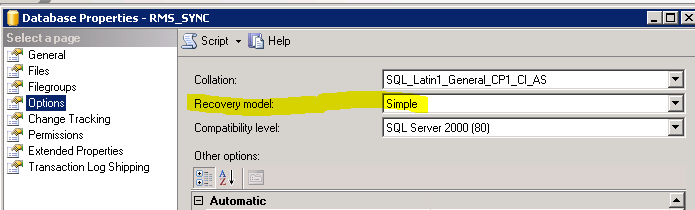
3. Right click on the database again and go to Tasks –> Shrink –> Database and click ok on the popup window. You can also read it and change some options but the defaults work fine. Do that for files as well (Tasks –> Shrink –> Files).
4. Right click on the database one last time and go to properties then options and set the recovery model back to full. Because if you leave it on simple and your SQL server crashes you would loose any transactions not flushed back into the DB.
3 Trackbacks